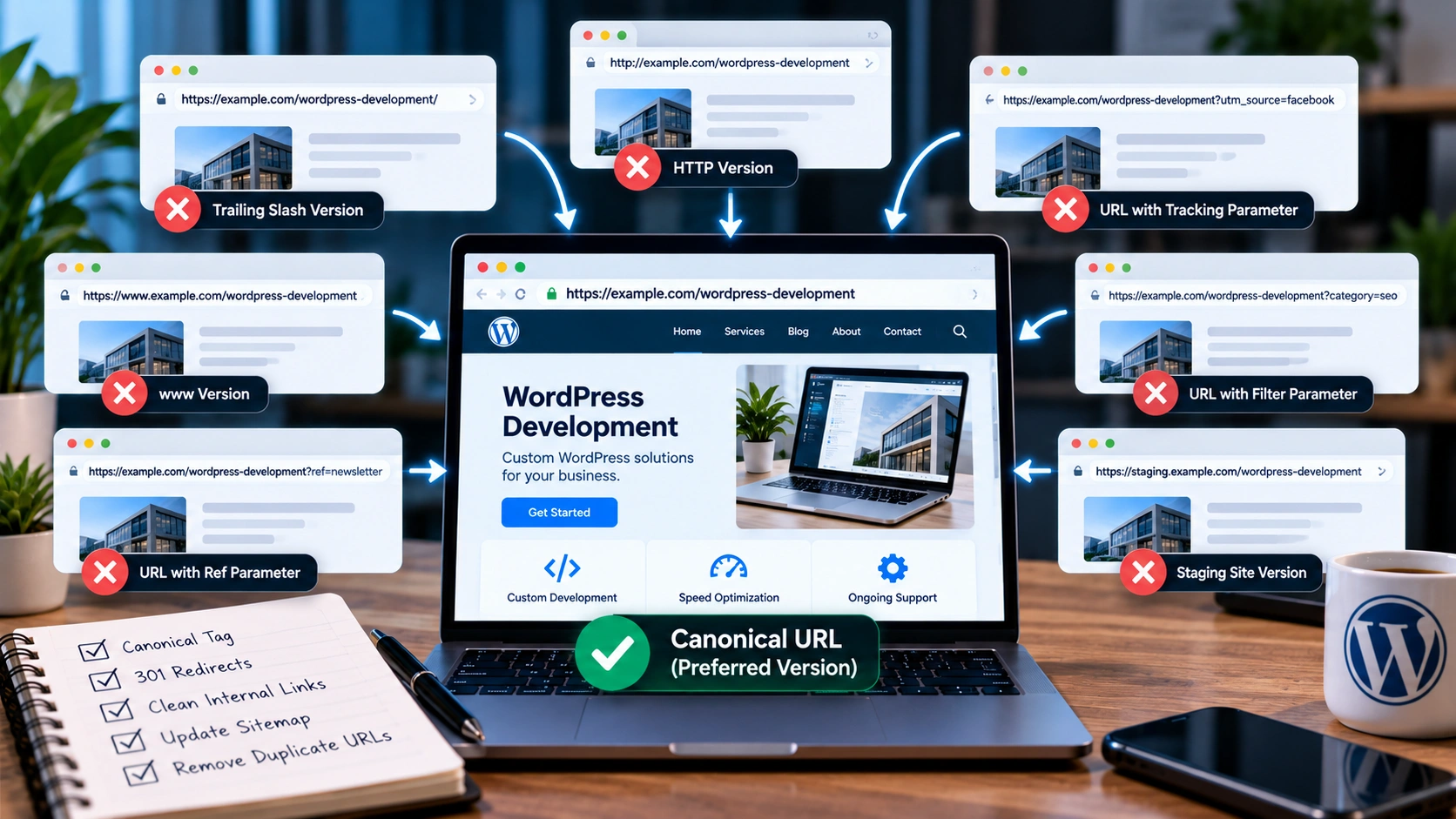
WordPress canonical URLs help search engines understand which version of a page should be treated as the main version when the same or very similar content is available through multiple URLs.
This sounds like a small technical detail, but duplicate URLs can appear surprisingly easily.
A page may be available with tracking parameters.
A category can generate several filtered versions.
HTTP and HTTPS versions may both exist.
A staging website might accidentally become crawlable.
A post may be accessible through more than one path after a migration.
When several URLs contain the same or nearly identical content, search engines must decide which version should represent that content in search results.
Google describes canonicalization as the process of selecting the representative URL for duplicate content. You can read Google's current explanation in its canonicalization documentation.
For WordPress websites, the goal is simple: make the preferred URL as clear and consistent as possible.
That normally involves more than adding a canonical tag.
Redirects, internal links, sitemaps and URL structure all need to support the same preferred address.
What Is a Canonical URL?
A canonical URL is the preferred version of a page among several duplicate or near-duplicate URLs.
Suppose the same page is available at:
https://example.com/service?utm_source=facebook
https://example.com/service?ref=newsletter
The tracking parameters may change the URL, but the actual page content remains the same.
You generally do not want all three URLs treated as separate search results.
Instead, the clean version:
should normally be treated as the main page.
A canonical tag can help communicate that preference.
In HTML, it commonly looks like this:
<link rel="canonical" href="https://example.com/service">For an indexable page that is already the preferred version, a self-referencing canonical is generally useful.
That means the page points to itself as canonical.
Why Duplicate URLs Happen in WordPress
WordPress itself often handles basic canonical behavior reasonably well, but themes, plugins, tracking systems and website changes can create additional URL versions.
Common causes include query parameters, filters, pagination, outdated permalink structures and migration leftovers.
For example, a WordPress site might create:
https://example.com/blog/post-name
and later another system produces:
https://example.com/blog/post-name?source=email
That is usually harmless when the canonical is handled correctly.
Problems become more serious when multiple versions are indexable and different parts of the website send conflicting signals about which one should be preferred.
Canonical Tags Are Signals, Not Magic Commands
One of the most important things to understand is that canonical tags are not absolute commands.
They are signals.
Google may choose a different canonical if other signals strongly disagree.
Imagine that your page contains this canonical:
https://example.com/wordpress-development
but every internal link points to:
https://example.com/services/wordpress-development
and your sitemap also contains the second URL.
You have created a contradiction.
The canonical says one thing.
The internal linking structure says another.
The XML sitemap says another.
The stronger approach is consistency.
Your canonical, internal links, sitemap and redirects should all point toward the same preferred URL whenever possible.
This is why canonicalization should be treated as part of technical SEO rather than a single tag added by an SEO plugin.
If your site has broader technical inconsistencies, my guide on fixing technical SEO problems before publishing more content explains how canonicalization fits with crawling, indexation, sitemaps and internal architecture.
Use Redirects When Duplicate URLs Are No Longer Needed
Canonical tags are useful when duplicate versions need to remain accessible.
But if an old URL no longer serves a purpose, a redirect is often clearer.
Suppose your old page was:
https://example.com/old-wordpress-service
and the new permanent location is:
https://example.com/services/wordpress-development
If the old page should no longer exist independently, a permanent redirect can send visitors and crawlers to the new URL.
Keeping the old page live and merely adding a canonical may leave unnecessary duplication in place.
Redirect when you truly want one URL replaced by another.
Use a canonical when multiple accessible versions have a valid reason to exist but one should be preferred for search.
Avoid Redirecting Every Removed Page to the Homepage
A common WordPress migration mistake is sending every removed URL to the homepage.
That may seem safer than returning a 404.
It is not always useful.
If an old article about WooCommerce checkout optimization disappears, redirecting it to a generic homepage does not provide visitors with an equivalent resource.
A better destination would be the closest relevant replacement.
If no meaningful replacement exists, returning a proper 404 or 410 may be cleaner than forcing an unrelated redirect.
This is particularly important when cleaning up years of old WordPress content.
My broader technical SEO guide covers redirect mapping and site cleanup in more detail.
Check HTTP and HTTPS Versions
One classic source of duplication is having both HTTP and HTTPS versions accessible.
For example:
The HTTPS version should normally be the preferred version.
The HTTP version should redirect directly to HTTPS.
The same applies to hostname variants.
You may have:
Choose one consistent preferred hostname and redirect the other.
Do not rely only on canonical tags to clean up protocol and hostname duplication when server-level redirects can resolve the issue more clearly.
Watch Trailing Slash Variations
Depending on the server and WordPress configuration, these can sometimes behave differently:
Ideally, one version should be preferred consistently.
WordPress often normalizes URLs based on its permalink settings, but custom routing, proxies or server rules can create exceptions.
Check what actually happens in the browser.
Does one version redirect to the other?
Do both return HTTP 200?
Do they output the same canonical?
Your internal links should use the final preferred version directly rather than relying on redirects.
Query Parameters Can Multiply URLs Quickly
Tracking and filtering parameters are another major source of duplicate URLs.
For example:
https://example.com/blog?utm_source=linkedin
https://example.com/blog?utm_source=email
https://example.com/blog?campaign=october
Those URLs may all show the same blog archive.
If they are crawlable and indexable, they can create unnecessary URL variations.
Tracking parameters usually do not need separate indexing.
A clean canonical pointing to the core URL can help.
However, not every parameter is meaningless.
Some parameters genuinely change the content.
A product filter that displays a substantially different set of items may require a different strategy from a simple analytics parameter.
That is why parameter handling should be reviewed based on what the URL actually produces.
WordPress Search Pages Usually Do Not Need Search Indexing
Internal WordPress search results can create many low-value URLs.
For example:
https://example.com/?s=wordpress
These pages may be useful to visitors who are already on the website, but they usually are not pages you need competing in Google Search.
Internal search results are typically better handled separately from normal articles and service pages.
Depending on the setup, they may be noindexed while remaining available to users.
This prevents internal search pages from becoming another large group of indexable URLs.
Category and Tag Archives Need a Clear Strategy
WordPress categories and tags can be useful.
They can also create thin, repetitive archive pages.
Imagine publishing one article and assigning it to five tags.
You may suddenly create five archive URLs that contain almost the same article preview.
That is not automatically a problem, but large numbers of thin archive pages can create unnecessary duplication and crawl noise.
Ask whether your taxonomy pages genuinely help users.
A category such as “WordPress” containing many useful articles may deserve to remain indexable.
A tag containing one post and no unique context may provide much less value.
Do not create hundreds of tags simply because WordPress makes them easy to add.
Pagination Can Create Confusion if Handled Poorly
Blog archives often span multiple pages:
/blog
/blog/page/2
/blog/page/3
These pages are not exact duplicates because they contain different articles.
They should not automatically all canonicalize to the first page if doing so prevents search engines from understanding the paginated series properly.
The correct solution depends on the site's implementation.
Pagination should be crawlable when it helps users and search engines reach older content.
This is one reason technical SEO needs to examine template behavior rather than applying the same canonical rule everywhere.
Self-Referencing Canonicals Are Useful
A normal indexable page can generally reference itself as canonical.
For example, if this article is published at:
https://amarildoprendi.com/blog/wordpress-canonical-urls-duplicate-content
the canonical should normally point to that same URL.
This creates a clear preference even if tracking parameters or other alternate versions appear later.
Your main service pages should follow the same principle.
My services page, for example, should have one clear preferred URL rather than allowing several competing variations to represent the same content.
Canonicals and Internal Links Should Agree
Internal links are one of the easiest places to strengthen canonical consistency.
Suppose Page A links to:
/service?ref=homepage
Page B links to:
/service/
Page C links to:
/service
even though only one is the true preferred URL.
That creates unnecessary variation.
Instead, internal links should point directly to the canonical version.
This avoids unnecessary redirects and gives search engines a cleaner picture of your site structure.
I cover internal linking in more depth in my guide to WordPress internal linking strategy.
Keep Duplicate URLs Out of the XML Sitemap
Your XML sitemap should normally contain canonical, indexable URLs.
It should not become a list of every URL your website can technically generate.
Avoid including redirected URLs.
Avoid including 404 pages.
Avoid adding parameter variations.
Avoid adding pages marked noindex.
If the sitemap says one URL is important but the canonical points somewhere else, you are sending conflicting signals.
Clean sitemaps make your technical setup easier to understand and maintain.
Canonical Tags Should Use Absolute URLs
A canonical should normally use the full preferred URL.
For example:
<link rel="canonical" href="https://example.com/services/wordpress-development">This is clearer than using only:
<link rel="canonical" href="/services/wordpress-development">Absolute URLs reduce ambiguity and are easier to audit.
Also ensure the hostname is correct.
A staging domain accidentally appearing inside production canonical tags can create serious SEO problems.
Staging Sites Can Create Dangerous Duplication
Development and staging websites are necessary for many WordPress projects.
But they should not compete with the live website.
Examples include:
staging.example.com
dev.example.com
example.hostingplatform.com
If a staging site becomes publicly crawlable and contains a full copy of the production website, search engines may discover duplicate versions of many pages.
Protect staging environments appropriately.
Depending on the environment, this may involve authentication, access restrictions or noindex controls.
Do not rely on robots.txt alone for sensitive staging environments.
The safest setup is one where search engines and random visitors cannot freely access the development copy.
Redesigns and Migrations Need Canonical Planning
Website redesigns often change URLs.
For example:
/web-design
may become:
/services/web-development
That change needs planning.
Before launching the new website, create a list of important old URLs.
Map each old URL to the closest relevant new page.
Update internal links.
Update the sitemap.
Confirm canonical tags use the new URLs.
Then implement redirects from old addresses to their replacements.
A redesign that looks excellent visually can still lose search visibility if URL changes are handled poorly.
Do Not Canonicalize Unrelated Pages Together
A dangerous shortcut is pointing many different pages to one broad page.
For example, imagine having separate useful pages for:
WordPress development,
technical SEO,
landing pages,
and WooCommerce development.
If all four pages contain unique, valuable information, they should not all canonicalize to the generic services page.
A canonical tells search engines that another URL is the representative version of the content.
Using it incorrectly can suggest that unique pages are duplicates when they are not.
My services page contains several different service areas, but detailed pages supporting those topics should remain independently indexable when they provide distinct value.
Canonicalization Cannot Fix Thin Content
Sometimes people use canonical tags to hide a larger content-quality problem.
If twenty pages differ only by one keyword, canonicalization does not automatically create a strong SEO strategy.
Ask why those pages exist.
Do they satisfy different search needs?
Do they contain genuinely different information?
Do they serve different audiences?
If not, consolidation may be better than maintaining many weak variations.
Your website architecture should be based on meaningful differences rather than generating hundreds of pages simply because different keywords exist.
This principle is especially important for service and location pages.
How to Audit Canonical URLs in WordPress
A practical canonical audit does not need to begin with every URL on the website.
Start with your most important templates.
Check:
the homepage,
service pages,
blog posts,
category archives,
pagination,
search results,
landing pages,
and product pages if WooCommerce is installed.
For each example, ask:
What URL loads?
Does another variation load too?
Does one version redirect?
What canonical appears in the source?
Does the canonical point to an indexable 200-status URL?
Is the same URL used in internal links?
Is it included in the XML sitemap?
Does Google Search Console show a different selected canonical?
These questions can reveal most common problems.
For larger websites, crawling software can collect canonical tags at scale and highlight conflicting patterns.
Google Search Console Can Reveal Canonical Disagreements
Google Search Console's URL Inspection tool can provide useful information about canonicalization.
It may show both the canonical you declared and the canonical Google selected.
If those two are different, do not immediately assume Google made an error.
Investigate the signals.
Perhaps your internal links point somewhere else.
Perhaps a redirect exists.
Perhaps the canonical URL itself redirects.
Perhaps the two pages are more similar than intended.
Perhaps your sitemap contains the wrong version.
Canonical disagreements are often symptoms of broader inconsistency.
A Better WordPress Canonical Strategy
A clean WordPress canonical strategy follows a few basic principles.
Choose one preferred URL for each unique page.
Redirect unnecessary duplicate versions.
Use self-referencing canonicals on indexable pages.
Keep internal links consistent.
Include only preferred indexable URLs in the sitemap.
Control unnecessary search, parameter and archive URLs.
Protect staging environments.
Review canonical behavior after redesigns, migrations and major plugin changes.
Most importantly, make all technical signals agree.
Canonical tags work best when they confirm a structure that is already clear.
They should not be used to compensate for a chaotic URL system.
Canonical URLs Are Part of a Bigger SEO Foundation
WordPress canonical URLs are one piece of technical SEO.
They work alongside redirects, sitemaps, internal links, robots directives, page structure and indexation controls.
A website with clean canonicalization is easier to crawl and easier to maintain.
More importantly, it reduces uncertainty about which URL should represent each page.
That is especially valuable as a WordPress site grows and accumulates more posts, landing pages, plugins and tracking parameters.
If your website has duplicate URLs, confusing canonical signals, indexation issues or an inaccurate XML sitemap, my SEO and website performance services cover technical SEO work, including canonicalization and internal structure.
For a deeper review, my Technical SEO Audit includes canonical and sitemap analysis, indexation review, internal-link analysis and other technical checks that can reveal problems before they spread across the site.